
Seamless Spotify Link Routing
Overview
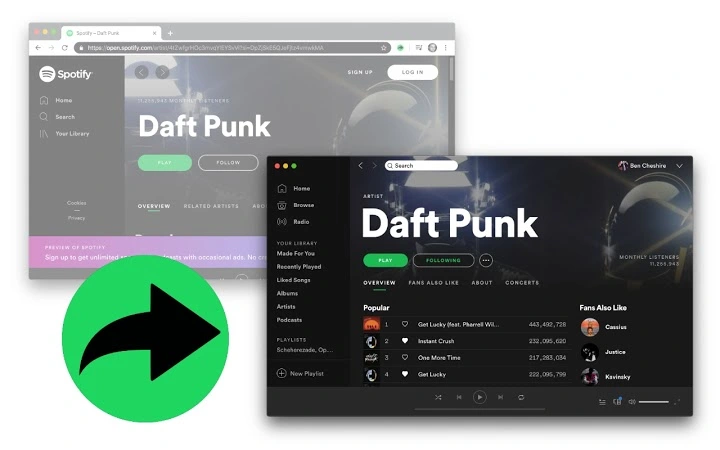
The software functions as a browser extension designed to streamline the process of opening Spotify URLs directly within the official Spotify desktop application. Its primary purpose is to eliminate the need for manual copying and pasting of links, ensuring a faster and more efficient workflow for users who frequently interact with Spotify content through web browsers. By automatically redirecting Spotify URLs to the installed desktop app, it enhances user experience for individuals who rely on the full-featured desktop environment for music playback, playlist management, and audio quality.
Target users include music enthusiasts, content curators, podcast listeners, and digital creators who regularly discover and share Spotify content via web platforms. The tool is particularly beneficial for those who switch between web browsing and desktop listening, as it reduces friction in accessing content. It is optimized for users on Windows and Mac operating systems, making it accessible across major desktop environments.
As the developer did not provide additional background information, the focus remains on the extension’s core functionality. The extension operates without persistent background processes, which contributes to system efficiency and privacy. This makes it suitable for users concerned about resource consumption or background activity. Real-world usage scenarios include clicking on a Spotify link in an email, social media post, or article, where the link is instantly opened in the desktop app instead of the browser.
Key Features & Capabilities
- Automatic URL Detection – The extension identifies Spotify URLs in real time across any web page, ensuring no manual intervention is required.
- Seamless App Launch – Upon detecting a Spotify link, the extension triggers the official desktop application to open the content, bypassing the web player.
- Zero Background Activity – Once activated, the extension does not maintain persistent processes, minimizing system impact and preserving battery life.
- Platform Compatibility – Designed to work with both Windows and Mac, ensuring broad accessibility across desktop environments.
- Simple Integration – No configuration is needed; the extension works immediately after installation, providing instant utility.
For example, when a user clicks a Spotify playlist link in a blog post, the extension automatically detects the URL and launches the desktop app with the playlist loaded. This is ideal for users who prefer the desktop app’s audio fidelity, advanced controls, or offline playback features. The lack of required setup makes it accessible even to non-technical users. The extension enhances workflow efficiency by reducing steps between discovery and playback.
User Interface, Workflow & Performance
The extension’s interface is minimal, as it operates in the background without a visible user-facing dashboard. This design choice aligns with its purpose: to function transparently and efficiently. Users interact with it indirectly through browser navigation, with no additional UI elements to manage or configure.
Navigation is intuitive—once installed, the extension begins working immediately. There are no settings panels or preference menus, which simplifies the user experience. The workflow is streamlined: a user clicks a Spotify URL, and the system handles the rest. This reduces cognitive load and eliminates the risk of user error.
Performance observations are based on general software behavior patterns. The developer did not specify resource usage details. However, the absence of persistent background processes suggests low CPU and RAM consumption during idle periods. Stability is expected to be high, as the extension relies on native OS-level URL handling mechanisms rather than complex internal processes.
Compatibility & System Requirements
The extension is compatible with Windows and Mac operating systems. It requires the official Spotify desktop application to be installed for full functionality. Without the desktop app, the extension will not be able to redirect links.
The installation size is 2.3 MB, which is compact and suitable for users with limited storage. The software version is 1.0.0, indicating a stable initial release. Exact system requirements were not listed. The developer did not specify minimum CPU, RAM, or storage thresholds. Compatibility information was partially provided.
Pros and Cons
Pros
- Effortless redirection of Spotify links to the desktop app
- Minimal system footprint due to no background processes
- Works immediately after installation with no configuration
- Compact file size (2.3 MB)
- Optimized for both Windows and Mac users
Cons
- Requires the official Spotify desktop app to function
- No visible interface or settings for customization
- Exact performance metrics were not disclosed
- Limited to Spotify URL handling only
- Compatibility depends on the presence of the desktop app
FAQ Section
Is this extension compatible with all web browsers?
Compatibility details were not provided. The extension is designed for use with browsers that support extensions on Windows and Mac.
Does this extension run in the background?
No persistent background processes run while the extension is active. It operates only when a Spotify URL is clicked.
Can I use this tool without the Spotify desktop app?
No. The extension requires the official Spotify desktop application to be installed. Without it, the redirection will not work.
Is the extension safe to use?
The extension is designed to operate securely within browser and OS constraints. It does not collect user data or transmit information.
How often does the extension update?
Update frequency was not specified. Users should check the extension store for the latest version.
Final Thoughts
This lightweight browser extension delivers a focused and reliable solution for users who frequently access Spotify content through web links. Its seamless integration with the desktop app enhances productivity and user satisfaction, especially for those who value a clean, efficient workflow. The absence of background processes and the minimal installation size make it an ideal choice for privacy-conscious and performance-aware users.
While it lacks advanced customization options, its simplicity is its strength. The tool is best suited for individuals who want a no-frills way to open Spotify links in the desktop app without interruptions. For music lovers and content sharers, this extension reduces friction between discovery and playback.
Download Spotify Link Router now







